
Today we have a guest post by Paul Shepherd. Paul describes the process he uses to define custom build steps when using Eclipse auto-generated Makefiles. He uses build version tagging to demonstrate this process.
Paul is the Lead Electrical Engineer at Benchmark Space Systems. He has spent time in the Aerospace, Consumer Audio, and Integrated Circuits fields, more often than not working at the intersection of hardware and software. You can contact him via LinkedIn.
Using Custom Build Steps with Eclipse Auto-generated Makefiles
Benchmark Space Systems recently had the opportunity to work with Embedded Artistry to develop our internal Software Release and Continuous Integration processes. From our first meeting, it was clear we shared a common belief that a good process is one where quality is the default outcome, rather than something you have to fight for. Furthermore, best practices aren’t dependent on your tools, but sometimes your tools guide how you implement those best practices. (Side note: Embedded Artistry’s Technology Radar is a good survey of the space that spans best practices and tools.)
In this short series, I’ll share how we implemented our CI process steps. In today’s post, we will cover implementing build version tagging with the Eclipse IDE and auto-generated Makefiles. In the next post, I’ll share how we got unit testing reports up and running on our production build server.
Benchmark Space Systems’ electronics utilize the MSP430FR5969-SP or its standard-reliability sibling. We use TI’s Code Composer Studio (CCS) for most of our development. CCS is built on the Eclipse IDE platform. We use auto-generated Makefiles to build our project locally.
We create our production builds on an Ubuntu build server running Jenkins. Performing the steps to define a build version is straightforward on the build server, since we maintain a custom Makefile under source control for producing our production builds. However, implementing the versioning steps with the Eclipse IDE posed a problem: if we are letting Eclipse automatically generate your Makefile, how can we add custom steps to the build process?
Inserting Custom Build Steps
Fortunately, Eclipse provides mechanisms for implementing custom build steps: the makefile.init, makefile.defs, and makefile.targets files. The auto-generated Makefile always includes these files from the project root directory. These files are optional, and the build process will work if they do not exist.
Makefile.init is included at the beginning and allows for custom initialization steps. Makefile.defs is included before the first compiler invocation and allows symbols to be defined. Finally, makefile.targets is included at the end of the generated makefile, and allows for defining custom build targets.
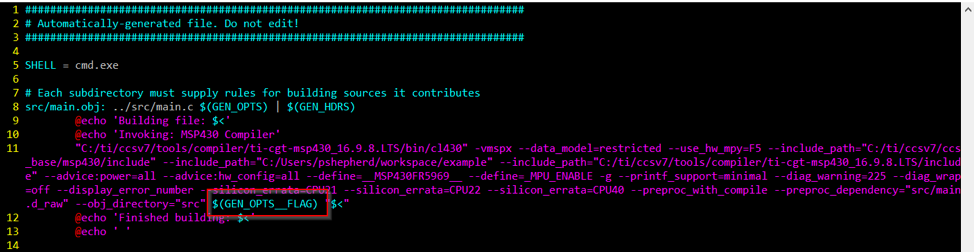
For build-tagging, we define the variable GEN_OPTS__FLAG in makefile.defs, and the compiler invocation includes this variable. This variable isn’t limited to just defining new symbols, so it has to include the complete argument, starting with –define as you can see below.

Since Eclipse automatically includes this file in the generated Makefile, these symbols will be used by the compile steps.
Handling Different Operating Systems
The exact formatting of the commands or expressions used within the Makefile depends on the operating system and shell you are using. On Windows, Eclipse will use cmd.exe to run all of the build steps, while Ubuntu uses Bash.
For example, we use the shell to generate the build timestamp and build machine strings. On Windows, the OS won’t easily give us a tidy build date and time, so we execute a two statement Python script:
BUILD_DATE := $(shell python -c "from datetime import datetime; print(datetime.utcnow().strftime('%d/%m/%Y, %H:%M'))"

BUILD_MACHINE := $(shell echo %username%)@$(shell hostname)
While Linux is much simpler, and only needs:
BUILD_DATE := $(shell date -u +"%d/%m/%Y, %H:%M")
BUILD_MACHINE := $(shell whoami)@$(shell hostname)
In order to support multiple platforms, we use the $(SHELL) variable in our makefile.defs file to select the proper behavior.
ifeq ($(SHELL), cmd.exe)
BUILD_DATE := $(shell python -c "from datetime import datetime; print(datetime.utcnow().strftime('%d/%m/%Y, %H:%M'))"
BUILD_MACHINE := $(shell echo %username%)@$(shell hostname)
else
BUILD_MACHINE := $(shell whoami)@$(shell hostname)
BUILD_DATE := $(shell date -u +"%d/%m/%Y, %H:%M")
endif
Putting it All Together
Here is our full Makefile.defs file:
ifeq ($(SHELL), cmd.exe)
BUILD_DATE := $(shell python -c "from datetime import datetime; print(datetime.utcnow().strftime('%d/%m/%Y, %H:%M'))"
BUILD_MACHINE := $(shell echo %username%)@$(shell hostname)
else
BUILD_MACHINE := $(shell whoami)@$(shell hostname)
BUILD_DATE := $(shell date -u +"%d/%m/%Y, %H:%M")
endif

version := $(subst -, ,$(shell git describe --long --dirty --tags))
COMMIT := $(strip $(word 3, $(version)))
COMMITS_PAST := $(strip $(word 2, $(version)))
DIRTY := $(strip $(word 4, $(version)))

ifneq ($(COMMITS_PAST), 0)
         BUILD_INFO_COMMITS := .$(COMMITS_PAST)
endif

ifneq ($(DIRTY),)
         BUILD_INFO_DIRTY :=+
endif

VERSION_TAG :=$(strip $(word 1, $(version)))
BUILD_INFO := $(COMMIT)$(BUILD_INFO_COMMITS)$(BUILD_INFO_DIRTY)

$(info Build Time: $(BUILD_DATE))
$(info Build Version: $(VERSION_TAG))
$(info Build Info: $(BUILD_INFO))

GEN_OPTS__FLAG += --define=VERSION_TAG="\"$(VERSION_TAG)\"" \
               --define=VERSION_BUILD_INFO="\"$(BUILD_INFO)\""\
               --define=VERSION_BUILD_MACHINE="\"$(BUILD_MACHINE)\""\
               --define=VERSION_BUILD_DATE="\"$(BUILD_DATE)\""
The makefile.init, makefile.defs, and makefile.targets files offer a middle ground between managing the complete build process on your own and giving up all control to an auto-generated build. You can use this example as a template for implementing your own custom build steps in projects using the Eclipse IDE.
Coming Up Next
In our next blog post, we will share our approach for setting up the Ceedling+Unity unit testing framework to output reports and posting them on a Jenkins/Pipeline build server.
Further Reading
-
Information from Texas Instruments (Code Composer Studio) on custom build steps
-
Gene Sally explains makefile.init, makefile.defs, and makefile.targets in Chapter 8 of Pro Linux Embedded Systems
Introduction to Build Systems Using Make
Ready to step beyond the IDE? Our hands-on course will teach you the basics of the software construction process using compilers and linkers, the Make language, and how build systems help us to automate the process while avoiding common build errors.
Learn More on the Course Page
Very useful info, thanks for sharing.
My Eclipse-based tool (Kinetis Design Studio 3, Win10, Make 4.1) doesn’t seem to add the GEN_OPTS__FLAG to the build rules, but I was able to add the defines (-D) within Eclipse.
i.e.
KDS->Project->Properties->C/C++ Build->Settings->Tool Settings->Cross ARM C Compiler->Preprocessor->Defined symbols (-D):
APP_CONFIG_$(VARIANT)
Now the problem that I am trying to solve is whenever the defined value changes (in my case its the variant that I’m building), Make doesn’t realize it should recompile all of the code. It seems that Make is only looking at the source file modification time-stamp to determine if it needs to recompile an object file and doesn’t consider the compiler options changing.
I could just add a clean before every build, but that would increase the re-build time unnecessarily if I don’t switch variants.
So what I’m thinking is that a pre-build-step should read a header file and if it doesn’t exist, or doesn’t contain “#define APP_CONFIG_$(VARIANT)”, then it should write that to it (and create it if necessary). This header file will be ignored by git, it is auto-generated.
This header file will be included in my source code where ever needed, and only when needed, so that Make will only re-compile the code that is necessary when the $(VARIANT) changes.
Is this the right approach? If so, how can I read and write to an .h file before the actual build happens?
This is definitely true, Make has no way of knowing that your compiler options changed. The approach you outlined – generating a configuration header – sounds reasonable. This is the kind of thing I’d normally turn to a higher-level build system for (Automake, CMake, Meson), but it might be doable with Make. I’ll play around with it to see if I can come up with something.
Reading and writing to a file in general can be done with the $(file) function: https://www.gnu.org/software/make/manual/html_node/File-Function.html