If you are building an embedded hardware product, it is important that you keep careful track of parts and materials needed for your engineering development builds. This is essential even if you are already using a well-managed BOM.
Development builds should be scheduled such that all materials are ready and QA’d to allow for the shortest, most efficient build time. That’s how you enable your engineers to learn the most from each iteration of hardware. Using a part tracker will enable you to keep up with the ever-changing details and will help you to succeed at that goal.
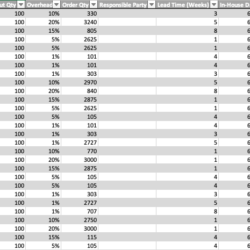
We’ve created two build inventory management templates that will help you drive engineering build materials according to their lead-times. For each part you are able to specify a required “in-house date”, when the part should be received for IQC (incoming quality control) and QA (quality assurance). The trackers will auto-calculate order dates given the part lead times, helping you to manage the ordering process and ensure that all parts will arrive on time. Tracking part lead-times and in-house dates allows you to properly prioritize part releases. You can ensure on-time releases of designs with the longest lead-times while providing your team with increased development time on parts with shorter lead-times.
These templates are what we use to manage projects at Embedded Artistry. Use them as a proven starting point for your own build management system – delete what you don’t need, re-order the columns to your liking, add new fields, update the auto-fill data validation lists, and change the names as you see fit.
SMA Part Tracker
The SMA (surface mount assembly) Part Tracker template is used to track the components for each PCBA.
We recommend placing each PCBA on a separate sheet. The SMA tracker is updated according to the electrical BOM for each revision of your electric design. These parts are managed by your electrical engineering team.
FATP Part Tracker
The FATP (final assembly, test, and packout) Part Tracker template is used to track all modules and components that are needed to complete the final form factor build.
This tracker should include all PCBAs, mechanical parts, mechanical modules/sub-assemblies, software builds (both manufacturing and customer versions), packaging parts, and consumables used on your assembly line. Generally, these parts and the assembly line are managed by your mechanical engineering team.
Who is Responsible for Managing This Information?
These part trackers can be managed by your engineering build manager, CM, procurement person, or any number of other roles. That person is responsible for ensuring that parts are ordered, arrive, and are ready to use at the start of each engineering build. You can also divide the responsibility of managing this information. For example, different people or teams are often responsible for SMA and FATP, and your part tracker ownership should reflect that.
We recommend having the CM or internal EE coordinator manage the SMA tracker. This person should ensure that EE BOMs are finalized according to the lead-times for the EE parts such that they arrive in time for SMA input for each PCBA.
For the FATP tracker, we recommend having the manager be the person responsible for procurement and coordination of the main assembly line during engineering development. This person should ensure that each FATP part is designed and released to its supplier in time to order and receive the part in time to perform IQC (incoming quality control) prior to the planned first input of your form factor build.
Notes on Managing Builds
These files should be re-built for each major development build (e.g. Proto, EVT, DVT, PVT). When re-building the files, you will keep any part inventory that you can reuse from the previous build. If you have smaller engineering builds (e.g. Pre-EVT, DVT2, etc.) you may not need to re-build the file. In this case, just use the “Build” column to keep track of parts that are special or different for that smaller build (deleting any parts that are no longer used and adding any new parts). This careful attention to detail will ensure that you have everything you need to run a successful hardware build.
Get the Templates
These templates can be purchased from the Embedded Artistry store.